
Start with who’s due.
Work from customer assignments, scheduled callbacks and your preferred calling frequency. Your team starts with a list they can act on.
For managers of customer calling teams
Give your team a clear calling list—and every customer a next step.
When callbacks live in spreadsheets and messages, it’s easy to lose track. Sellit brings customer priorities, conversation history and follow-ups into one daily workflow.
Personal onboarding · 14-day SalesPilot trial · Up to 3 users
A clear owner / A useful conversation / A next step
From calling sheet to daily routine
Keep the caller’s screen focused. Give the manager a view of who is being contacted and what still needs attention.
Work from customer assignments, scheduled callbacks and your preferred calling frequency. Your team starts with a list they can act on.
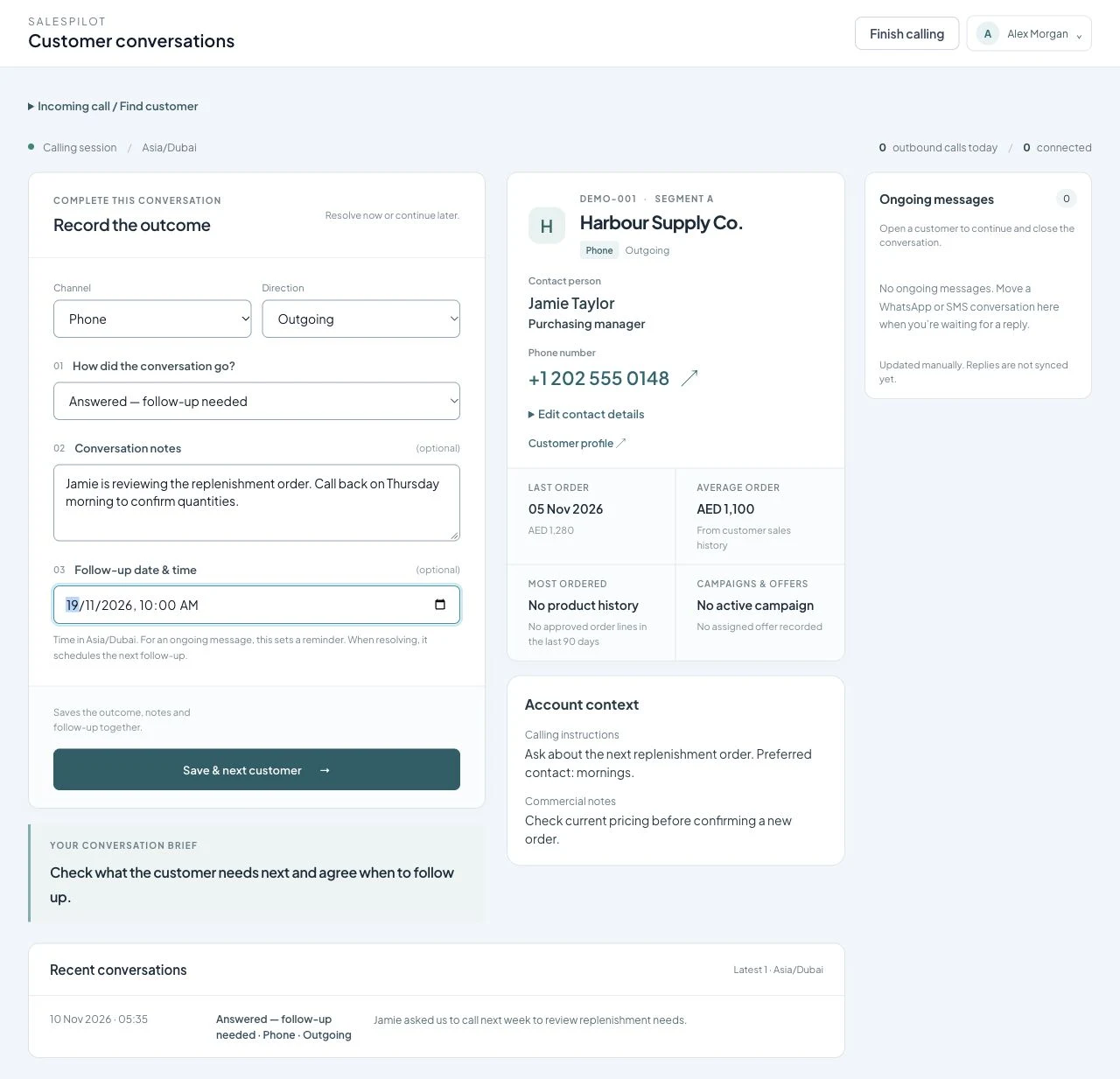
See the contact person, phone number, recent conversations and available sales history. Record calls and keep ongoing messaging conversations visible.
Record the outcome, add useful notes and schedule a follow-up when needed. Save and move on to the next customer.
A clearer view for the manager
See calling activity, connected calls and due callbacks. Assign customers, set individual targets and help your team follow through.

Start with your daily calling routine
We’ll walk through your follow-up process and help you set up a focused trial. You can start with customer and sales imports, without connecting an ERP.
Walk through how your team assigns customers, records conversations and remembers callbacks today.
Prepare customer records, assign callers and choose calling frequencies. Try SalesPilot for 14 days with up to 3 users.
Look at callback completion, customer coverage and the team’s experience. Decide whether Sellit fits your daily work before continuing.
Start with SalesPilot
$19 per workspace + $9 per user, per month.
USD, billed monthly, excluding tax. Custom onboarding and ERP integration are quoted separately.
SalesPilot for a team of 3
$46 / monthTry it free for 14 days. No credit card.
No automatic charge when your trial ends.
Your trial starts when your workspace is ready.
Room to grow
SalesPilot is part of Sellit. Explore order review and account analysis when those workflows become your next priority.
Turn customer order messages and uploads into reviewable order lines. Match customers and products, approve the order, and optionally queue ERP delivery.
AccountIQUnderstand account performance, identify growth and reactivation opportunities, and prioritise your next sales action with AccountIQ.
Before we talk
How Sellit fits your team, your customer data and your working day.
Sellit is built for sales managers and calling teams that maintain ongoing customer relationships. It is useful when customer ownership, callbacks and conversation notes are spread across spreadsheets, inboxes and messaging apps. Your business can be in any sector: the common need is a clear daily calling routine and a reliable next step for each customer.
SalesPilot uses your customer assignments, calling frequencies, scheduled callbacks and available sales activity to organise the queue. Callers open a customer, review the contact details and history, record the conversation and save the next step. Managers can adjust assignments and individual targets, and review calling activity and due callbacks.
Yes. Your team can record the channel and keep customers with ongoing messaging conversations in a pending list while continuing to call other customers. Return to the customer to record the outcome and close the conversation. SalesPilot tracks this workflow; it does not automatically sync your WhatsApp inbox or send messages on your behalf.
Yes. Import customers using the template and review the column mapping before processing. You can also import recent sales to add purchase history and help prioritise accounts. Keep customer codes consistent between files, and include contact names and phone numbers where available. We can walk through preparation during your pilot demo.
You can start with customer and sales imports and use your existing phone and messaging tools. Calling links use your device’s calling handler; Sellit does not include a managed dialler or call recording. An ERP connection is a separate option. Sellit’s Business Central connector supports approved order delivery and requires configuration and validation.
We contact you by email to arrange a walkthrough of the calling and follow-up workflow. We discuss your team, customer data and the problem you want to improve, then agree the setup for a focused trial. There is no obligation to continue after the trial.
Try SalesPilot free for 14 days with up to 3 users. No credit card is required and there is no automatic charge. Request a trial and the team will contact you to arrange the workspace. The trial begins when your workspace is ready. At the end, choose whether to continue on a paid plan. The offer covers SalesPilot; AccountIQ and OrderFlow are separate modules.
SalesPilot costs $19 per workspace plus $9 per user, per month. For 3 users, that is $46 per month. Prices are in USD, billed monthly and exclude tax. Custom onboarding and ERP integration are quoted separately. OrderFlow and AccountIQ are optional modules with additional fees.
SalesPilot focuses on customer calling and follow-up. OrderFlow adds order capture and human review, while AccountIQ supports account analysis and action recommendations. You can start with SalesPilot and add modules as your needs grow. All prices are USD, billed monthly and excluding tax. Each user costs $9/month, charged once across selected modules. Module fees are additional: SalesPilot $19/workspace/month; OrderFlow $29/workspace/month plus processing usage; AccountIQ $39/month for up to 100 enabled customer accounts; $59/month for up to 500 enabled customer accounts; $99/month for up to 2,000 enabled customer accounts. AccountIQ tiers replace one another and count enabled customer accounts, not individual contacts. OrderFlow processing allowances and additional usage are quoted before activation. Custom onboarding and ERP integration are quoted separately.
Let’s look at your follow-up process
Request a pilot demo. We’ll contact you by email to arrange a walkthrough and discuss a 14-day trial for your team.
No credit card required. Already using Sellit? Sign in →